On August 15, 2026, being "in control" of your cybersecurity stops being a figure of speech. That's the day the Cyberbeveiligingswet (CBW), the Dutch implementation of the EU NIS2 directive, enters into force. It lands on roughly 8,000 organisations in the Netherlands, and it moves the accountability up a floor: to the board.
Here's the part that changes the Tuesday-afternoon conversation. Under the CBW, the duty of care isn't something you can fully delegate to IT. Board members can be held personally accountable, supervisor the RDI (Rijksinspectie Digitale Infrastructuur) can direct measures at individual directors, and the fines reach up to 10 million euro or 2% of annual turnover. There's even a mandatory training obligation for directors. "In control" just became a word a director has to be able to defend, not a box IT ticks.
What the CBW actually asks of you
The law is short on buttons and long on outcomes. Three obligations do most of the work:
- Zorgplicht (duty of care). Run a risk analysis and take appropriate technical and organisational measures. It explicitly extends to your suppliers and chain partners, not just your own tenant.
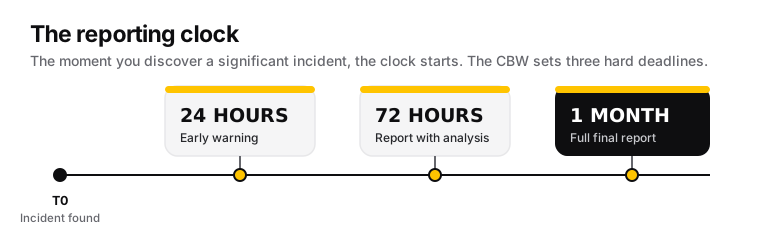
- Meldplicht (incident reporting). A significant incident gets an early warning within 24 hours, a fuller report within 72 hours, and a final report within one month. (RDI: Meldplicht)
- Registratieplicht. You register your organisation with the supervisor so they know you exist and which regime you fall under.
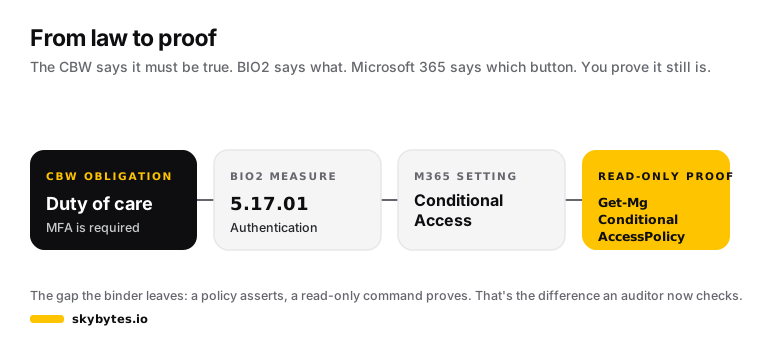
For government bodies, the duty of care lines up with a standard you already know: the Baseline Informatiebeveiliging Overheid, BIO2. And that's where "in control" gets concrete. BIO2 tells you what must be true. It does not tell you which setting in Microsoft 365 makes it true, or how to prove it still is.
That gap is the whole problem. A policy binder that says "we enforce MFA" is not evidence. An auditor, and now a supervisor, wants the list: which measure, which setting, and a check anyone can re-run to see it's really there.
"In control" is a verb, not a binder
The uncomfortable truth about most compliance programmes is that they're built on assertion. Someone wrote "access is reviewed annually" in a document in 2023, and everyone has been nodding at it since. Nobody has run the query that proves a review actually recurred.
Being in control means the opposite: for every measure that matters, you can point at the setting and produce a read-only command that shows its live state. Not a screenshot from last quarter. The state, today, on demand.
So we built the thing that closes the gap between the BIO2 measure and the Microsoft 365 reality: the BIO2 control map. Every mapped government measure gets three things:
- The concrete M365 setting that implements it (Conditional Access, a Purview retention policy, an Intune compliance policy, a PIM assignment).
- The licence it needs, named exactly, because this is where claims quietly break.
- A read-only PowerShell command you run in your own tenant to verify it. Trust, but verify.
It also does the honest thing most vendor mappings won't: it flags the measures where Microsoft 365 is not the answer. Backup (BIO2 8.13) is the clearest one. M365 has retention, versioning and a recycle bin, none of which is a backup that survives ransomware or a bad bulk edit that syncs perfectly. Ticking that box with "it's in the cloud" is exactly the kind of assumption a supervisor is now empowered to punish.
You don't need the most expensive licence to be in control
Here's the myth worth killing before it costs you a renewal: that CBW readiness means buying Microsoft 365 E5 for everyone. It doesn't.
Walk the control map and a pattern shows up. A large share of the provable measures sit on licences you very likely already own:
- Conditional Access MFA, device compliance, admin-portal protection, Terms of Use for provable acceptance of policies: Entra ID P1, which ships in Microsoft 365 Business Premium and E3.
- Intune compliance and app protection policies, removable-media control, endpoint hardening: Intune Plan 1, also in Business Premium and E3.
- Unified audit log, DKIM and DMARC, sensitivity labels, retention policies, Secure Score: included or in E3.
E5 buys you the long tail: automatic labelling, Audit (Premium) retention beyond 180 days, Defender XDR, attack simulation training. Real value, but not the entry ticket. The sharper move is to know which control sits on which shelf, prove everything your current licence already covers, and make a deliberate, documented decision about the gaps, rather than panic-buying the top SKU. The control map names the shelf for every measure, and the companion Licensing tool decodes the SKUs.
The one number that moves: prove the trend
You can't screenshot "in control." But you can produce a signal that changes over time, which is exactly what a PDCA cycle and a board report need. In Microsoft 365 that signal is Microsoft Secure Score, and it's read-only, licence-included, and has history.
This is the smallest possible "prove it" you can run today. It won't make you compliant, but it turns "we're improving our security posture" from a sentence into a line on a graph.
<#
.SYNOPSIS
    Pulls the Microsoft Secure Score trend so you can show posture over time,
    not a single point-in-time claim. Read-only.

.DESCRIPTION
    Secure Score is the one built-in M365 measurement with history per control.
    The trend is the evidence a board report and a PDCA cycle actually need:
    proof the line moves, in the right direction. This does not change anything.

.NOTES
    Required Graph scope : SecurityEvents.Read.All
    Module               : Microsoft.Graph.Security

    Secure Score is NOT a BIO2 score. It's a useful trend to underpin your
    'in control' story, never a compliance percentage. The weighting is
    Microsoft's, not the BIO2's.
#>

Connect-MgGraph -Scopes SecurityEvents.Read.All

# The trend is the evidence, not the snapshot. Grab the last 12 measurements.
Get-MgSecuritySecureScore -Top 12 |
    Select-Object CreatedDateTime, CurrentScore, MaxScore,
        @{n = 'Percentage'; e = { [math]::Round($_.CurrentScore / $_.MaxScore * 100, 1) } } |
    Sort-Object CreatedDateTime
A rising line is a fair thing to put in front of a director. A flat line since 2024 is a conversation you'd rather have with yourself than with the RDI. Just don't dress the percentage up as a BIO2 compliance figure: the weighting is Microsoft's, and a supervisor will know the difference.
Where to start before August 15
You have just over two weeks. Nobody closes NIS2 in two weeks, and anybody selling you that is selling. What you can do is stop guessing and start proving:
- Run the Secure Score trend above. That's your baseline and your first board slide.
- Open the BIO2 control map, filter to GEDEKT (covered), and run the read-only check for the measures you claim to have in place. Confirm the policy is actually enabled, not sitting in report-only.
- Filter to NIET (not covered by M365) and write those down as deliberate decisions with a compensating control, not silent gaps. That list, honestly kept, is itself evidence of a working duty of care.
Being in control was never the day you configured the tenant carefully. It's the day you went back and checked, wrote down what you found, and could hand the whole thing to someone who's allowed to fine your director. The CBW just set a date on it.
Want the control map folded into a recurring, evidenced BIO2 baseline for your tenant before the deadline? Let me know.
Sources: Digitale Overheid, Cyberbeveiligingswet · RDI, Meldplicht Cyberbeveiligingswet · RDI, Bestuurlijke verantwoordelijkheid en governance. BIO2 measure text: bio-overheid.nl.